
Introduction
Generating leads is only the beginning of the sales process. The real challenge is making sure every lead is contacted, followed up with, qualified, nurtured and moved through the sales pipeline at the right time.
This is where Zoho CRM automation can make a significant difference.
In 2026, businesses can use Zoho CRM automation to reduce repetitive sales tasks, organize lead follow-ups, automate notifications, assign leads, update records, create activities and build structured follow-up sequences. Zoho CRM provides workflow rules, scheduled actions, scoring rules, Cadences, webhooks and custom functions to support different levels of sales automation.
Instead of asking your sales team to remember every follow-up manually, you can design a CRM system that helps the team act at the right time.

In this guide, we explore 10 practical ways to use Zoho CRM automation to improve lead management and move more prospects toward conversion.
What Is Zoho CRM Automation?
Zoho CRM automation means using predefined rules, triggers and actions to automatically perform repetitive CRM activities.
For example, when a new lead enters your CRM, automation can:
- Assign the lead to the appropriate salesperson
- Send an email notification
- Create a follow-up task
- Update the lead status
- Schedule a future activity
- Trigger a personalized follow-up sequence
- Send information to another application
- Update related CRM records
Zoho CRM workflow rules can trigger actions when specific conditions are met. These actions can include emails, tasks, field updates, webhooks, custom functions and other automated activities.
The objective is simple: reduce manual work while making your sales process more consistent.
10 Ways to Use Zoho CRM Automation for Better Lead Conversion
1. Automatically Capture Leads From Multiple Sources
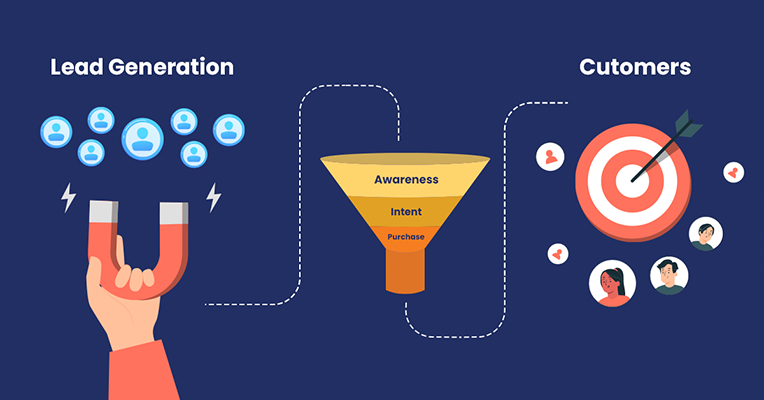
Leads can come from websites, landing pages, advertisements, social media, events, referrals and other channels.
If these leads are manually entered into a CRM, there is a higher chance of delayed entry, duplicate records or missing information.
A connected lead-generation process can automatically bring new enquiries into Zoho CRM and start the appropriate sales workflow.
For example:
Website enquiry → Zoho CRM → Lead assignment → Notification → Follow-up task
This gives your sales team a structured process from the moment a prospect enters the system.
Zoho Flow can also connect Zoho CRM with other applications and automate lead-management processes across systems.
Why it matters
The faster and more consistently a new enquiry enters your sales process, the easier it becomes to manage the opportunity without relying on spreadsheets or scattered messages.
2. Automatically Assign Leads to the Right Salesperson
Not every lead should go to the same salesperson.
Businesses may need to assign leads based on:
- Location
- Industry
- Product
- Lead source
- Customer type
- Territory
- Lead score
- Sales team
- Business size
Zoho CRM automation can help create assignment processes based on your business rules.
For example:
Lead from Kerala → Kerala Sales Team
Enterprise enquiry → Enterprise Sales Team
High-priority lead → Senior Sales Executive
This creates clearer ownership and reduces the possibility of leads remaining unattended.
3. Send Instant Notifications When a New Lead Arrives

A lead sitting inside a CRM without anyone knowing about it does not help your sales team.
You can configure automation so that important events trigger notifications.
For example:
New high-priority lead created → Salesperson notified
or
Lead becomes qualified → Sales manager notified
Zoho CRM workflow rules can trigger notifications and other actions when predefined criteria are met.
This is particularly useful for businesses where enquiries need a quick response.
4. Automate Lead Follow-Ups

One of the most common sales problems is simple:
A salesperson forgets to follow up.
A lead may receive an initial call but never receive the second or third follow-up.
Zoho CRM automation can help create tasks and scheduled activities so that follow-ups become part of the sales process rather than something employees have to remember manually.
A simple process could look like:
Day 0: New enquiry
Day 1: Follow-up task
Day 3: Second follow-up
Day 7: Follow-up reminder
Day 14: Re-engagement activity
For more structured sequences, Zoho CRM Cadences can automate personalized follow-ups involving emails, calls and tasks, with the sequence responding to customer interactions.
The goal isn’t to send more messages.
The goal is to make sure important leads don’t disappear from the sales pipeline.
5. Use Lead Scoring to Prioritize Sales Efforts
Not every lead has the same level of interest.
One prospect may have simply downloaded an article, while another may have requested a product demonstration.
Lead scoring can help sales teams identify which records deserve greater attention.
You can consider signals such as:
- Website engagement
- Email interaction
- Lead source
- Industry
- Company size
- Product interest
- Previous interactions
- Form submissions
Zoho CRM provides scoring rules that can help identify records that require greater attention.
For example:
Low score → Nurture
Medium score → Sales follow-up
High score → Priority sales action
This helps salespeople spend more time on leads that meet the business’s qualification criteria.
6. Automatically Update Lead Status
Sales teams often forget to update CRM records after calls, meetings or other activities.
That creates another problem: managers cannot trust the pipeline data.
Automation can help standardize status updates.
For example:
New → Contacted → Qualified → Proposal Sent → Negotiation → Won/Lost
When specific actions or conditions occur, CRM automation can update appropriate fields or trigger additional activities.
Zoho CRM workflow rules support automated field updates and actions based on predefined conditions.
A clean pipeline gives managers a clearer view of where leads are getting stuck.
7. Automate Lead Nurturing With Personalized Follow-Ups
Not every prospect is ready to buy immediately.
Some leads need:
- More information
- A product demonstration
- Pricing details
- Case studies
- Multiple conversations
- Internal approval
- Time before making a decision
Instead of marking these leads as lost, businesses can build a structured nurturing process.
Zoho CRM Cadences are designed for sequential, personalized follow-ups across channels such as email, calls and tasks.
For example:
New enquiry → Introduction email → Product information → Follow-up task → Sales call → Demo→Proposal → Decision follow-up
The exact sequence should depend on the business, product and sales cycle.
8. Automatically Escalate Leads That Are Not Being Followed Up
Automation should not only remind salespeople.
It can also help managers identify leads that are becoming inactive.
For example:
Lead untouched for 3 days → Salesperson reminder
Lead untouched for 5 days → Manager notification
High-value lead inactive → Escalation
Zoho CRM supports scheduled actions and automation processes that can be used to identify and act on records according to defined business conditions.
This creates accountability without requiring managers to manually check every lead.
9. Connect Zoho CRM With Other Business Applications
Your CRM does not always operate alone.
Businesses may use:
- Zoho Books
- Zoho Campaigns
- Zoho Forms
- Zoho Desk
- Zoho Projects
- Zoho Analytics
- Payment gateways
- Websites
- E-commerce platforms
- Third-party applications
Integrating these systems can reduce duplicate data entry and create smoother processes.
For example:
Website form → Zoho CRM → Sales follow-up → Deal → Zoho Books → Invoice
Zoho CRM can use webhooks, custom functions and integrations to communicate with other applications, while Zoho Flow can connect CRM with external applications and automate data movement.
A connected technology ecosystem can be particularly valuable when a business is growing and multiple departments need access to the same information.
10. Automate Lead Conversion When Qualification Criteria Are Met
The final objective of lead management is not simply collecting leads.
It is moving qualified prospects into the appropriate sales process.
Zoho CRM supports automated lead conversion through workflow rules when predefined criteria are met. Depending on the workflow configuration, a qualified lead can be converted into associated records such as a contact, account and deal.
For example:
Lead Status = Qualified
↓
Qualification criteria satisfied
↓
Lead conversion
↓
Contact + Account + Deal
↓
Sales pipeline
This can reduce unnecessary manual steps and create a more standardized sales process.
However, automated conversion should be designed carefully. Businesses should define clear qualification criteria before automatically converting records.
Zoho CRM Automation: Workflow Rules vs Cadences
A common question is whether businesses should use Workflow Rules or Cadences.
They solve different problems.
| Automation | Best suited for |
|---|---|
| Workflow Rules | Triggering specific actions when conditions are met |
| Cadences | Managing sequential sales follow-ups |
| Schedules | Running recurring automated processes |
| Scoring Rules | Prioritizing leads |
| Webhooks | Sending information to external applications |
| Custom Functions | Handling more customized business logic |
Zoho describes Workflow Rules as condition-based automation, while Cadences are designed around sequential and personalized follow-ups.
The right combination depends on the company’s sales process.
Example: A Complete Automated Lead Journey
Imagine a company receives a new enquiry through its website.
A properly designed CRM automation process could look like this:
Step 1 — Lead Capture
Website enquiry enters Zoho CRM.
↓
Step 2 — Lead Assignment
The system assigns the lead to the appropriate salesperson.
↓
Step 3 — Notification
The salesperson receives an alert.
↓
Step 4 — Qualification
The salesperson qualifies the enquiry.
↓
Step 5 — Lead Scoring
The CRM identifies the lead’s priority based on predefined criteria.
↓
Step 6 — Follow-Up
A task or Cadence starts according to the sales process.
↓
Step 7 — Proposal
The qualified prospect moves into the appropriate sales stage.
↓
Step 8 — Follow-Up
Automated reminders help the salesperson maintain communication.
↓
Step 9 — Conversion
Once the defined qualification criteria are met, the lead can be converted into the appropriate CRM records.
↓
Step 10 — Customer Process
The customer moves into the next stage of the business process.
This is where CRM automation becomes more than a collection of individual rules. It becomes an end-to-end sales process.
Common Zoho CRM Automation Mistakes to Avoid
Automation is powerful, but adding too many rules without proper planning can make a CRM difficult to manage.
Avoid these common mistakes:
1. Automating a broken process
If the sales process is unclear, automation can simply make the confusion happen faster.
2. Creating too many notifications
Too many alerts can lead to notification fatigue.
3. Using the same follow-up sequence for every lead
Different customer segments may require different communication.
4. Ignoring CRM data quality
Automation depends on accurate data.
5. Converting leads too early
Define clear qualification criteria before automating lead conversion.
6. Forgetting human interaction
Automation should support salespeople, not replace meaningful customer conversations.
7. Connecting applications without mapping the process
Before integrating CRM with other systems, understand what information needs to move, when it needs to move and who owns it.
How Cascade Headway Helps Businesses Automate Zoho CRM
At Cascade Headway, we help businesses implement, customize and integrate Zoho applications around their actual business processes.
Our approach goes beyond simply switching on CRM features.
We can help businesses with:
- Zoho CRM implementation
- CRM workflow automation
- Lead management
- Sales pipeline configuration
- Lead assignment
- Follow-up automation
- CRM customization
- Zoho CRM integrations
- Data migration
- Custom functions and business logic
- Zoho application integration
- CRM dashboards and reporting
- User training
- Post-implementation support
Cascade Headway’s Zoho services include CRM implementation and customization, automation, integrations, data migration, training and ongoing support.
We focus on understanding the business process first and then configuring the technology around that process.
Ready to Automate Your Zoho CRM?
If your sales team is still managing leads through spreadsheets, manual reminders, scattered WhatsApp messages or repetitive data entry, it may be time to review your CRM workflow.
The right Zoho CRM automation strategy can help your team organize leads, improve follow-up consistency, reduce repetitive work and create a more structured path from enquiry to customer.
Looking to automate Zoho CRM for your business?
Talk to Cascade Headway about Zoho CRM implementation, customization and automation designed around your business process.
Build a CRM that works around your business — not the other way around.